
Let’s be real for a second: if you are still dragging and dropping files onto a server via FTP, or manually running test scripts on your local machine before a release, you are playing a dangerous game.
I used to dread deployment days. They meant late nights, broken environments, and the inevitable “but it works on my machine!” excuses. That all changed when I finally wrapped my head around CI/CD (Continuous Integration and Continuous Delivery).
I’ve put together this 18-day roadmap based on the “Tech Fusionist” learning plan. Whether you are a total beginner or just looking to modernize your workflow, this step-by-step guide is exactly how I’d teach it to a junior dev on my team.
Let’s dive into the invisible assembly line of modern software delivery.

Module 1: The Foundations
Day 1: What actually is CI/CD?
To me, CI/CD is like an automated factory line for your code. Continuous Integration is all about merging code frequently and auto-testing it, while Continuous Delivery ensures your application is always in a release-ready state. The goal? Deliver better software, way faster, with significantly fewer bugs.

Day 2: SDLC & The DevOps Infinity Loop
You’ve probably seen that DevOps “infinity loop” everywhere. Here is my take: DevOps is the culture, but CI/CD is the actual engine running it. Moving from sluggish Waterfall to Agile helped us release faster, but CI/CD is what actually automates that flow from planning to monitoring. Silos between developers and operations just slow everything down we have to work together.

Day 3: Everything Starts with Git
You can’t automate what you can’t track. Git is your distributed time machine. My personal golden rule here: commit early, commit often, and write clear commit messages. And please, for the love of everything, use a .gitignore file so you aren’t accidentally pushing node_modules or secrets to your repo.

Module 2: Controlling the Chaos (Source & Pipelines)
Day 4: Branching Strategies
I have lived through merge conflict hell, and it usually happens because of long-running branches. While Git Flow is highly structured, I personally prefer the GitHub Flow or Trunk-Based development for CI/CD keeping branches short-lived means fewer headaches when it’s time to merge. Always protect your main branch with Pull Request reviews and passing automated checks.

Day 5 & 6: Building the Pipeline
Think of a pipeline as a sequence of stages (Build, Test, Deploy), broken down into specific jobs and steps. If a stage fails, the pipeline stops dead in its tracks, which is exactly what you want (“fail fast”).

On Day 6, we focus on Build Automation. This is where source code becomes a runnable artifact. If your build only works on your specific laptop, it’s broken. We automate the build matrix so the output is identical and reproducible every single time.

Module 3: Testing & Tooling
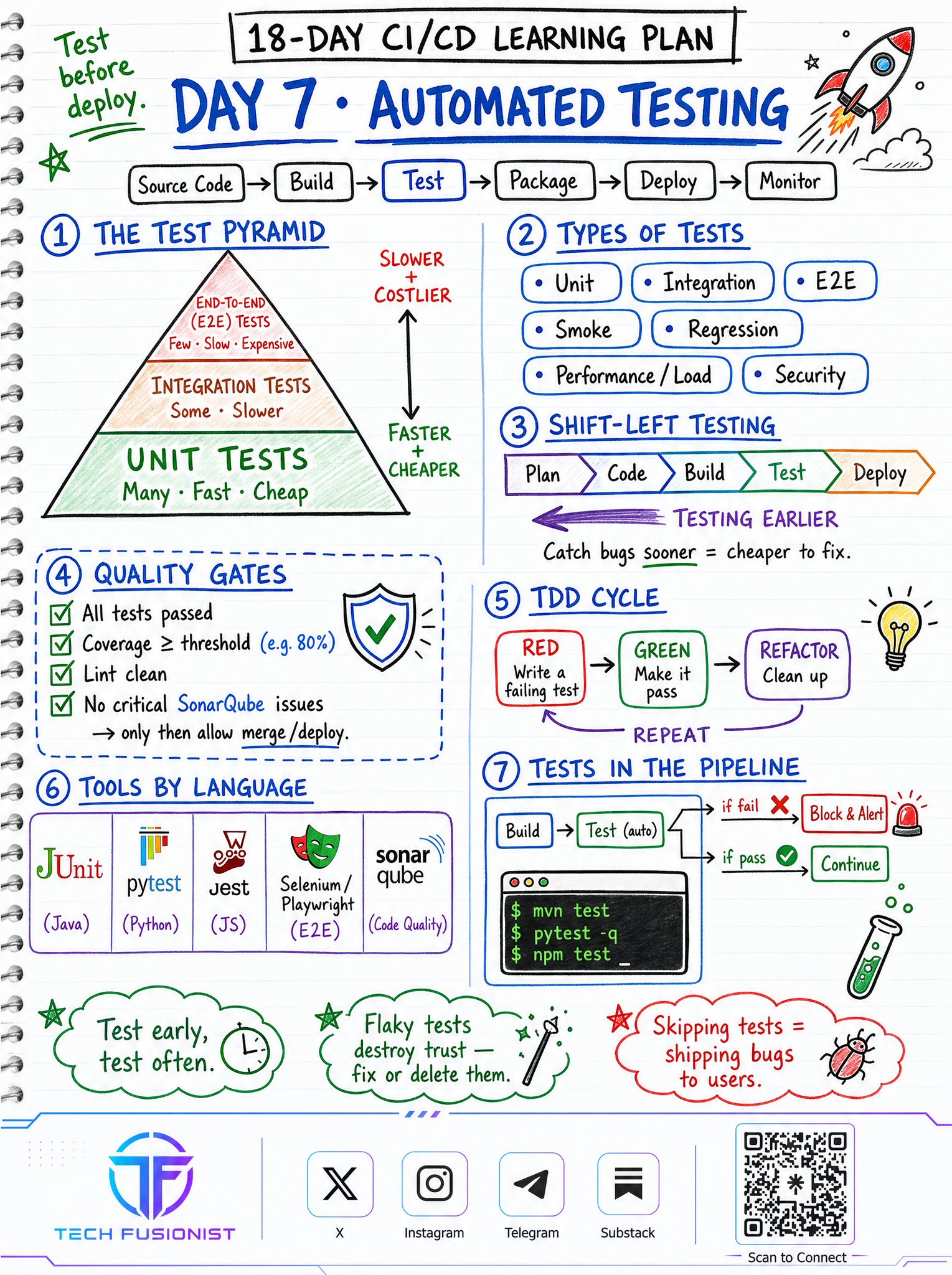
Day 7: Automated Testing (The Safety Net)
If you are skipping tests, you are just shipping bugs to users faster. I lean heavily on the “Test Pyramid”: write tons of fast, cheap Unit Tests, some Integration Tests, and a few End-to-End tests. Shift your testing left catching a bug during the build phase is infinitely cheaper than fixing it in production. Oh, and if you have flaky tests that fail randomly? Fix them or delete them. They destroy team trust.
Day 8 & 9: The CI/CD Tools Landscape & Jenkins
There are so many tools out there: GitLab CI, CircleCI, Azure DevOps. My advice? Don’t chase shiny objects; pick the tool that matches your team’s workflow.

We can’t talk CI/CD without bowing to Jenkins. It’s the self-hosted granddaddy of automation. The biggest takeaway here is to avoid “click-configuring” your jobs in the UI. Write a Jenkins file so your pipeline is version-controlled.

Module 4: Modernizing the Flow
Day 10: GitHub Actions
Honestly, GitHub Actions is my favorite tool right now. Since it’s built right into your repo (.github/workflows/), it’s incredibly frictionless. You can trigger workflows on a push, a PR, or even a cron schedule. The marketplace is fantastic for reusing community actions so you don’t have to reinvent the wheel.

Day 11: Pipeline as Code
If your pipeline isn’t defined in a YAML or Groovy file stored in Git, it essentially doesn’t exist. UI-clicked pipelines drift over time and are impossible to audit. Keep it declarative, review it via PRs just like app code, and keep your code DRY (Don’t Repeat Yourself).

Day 12: Artifacts & Immutability
An artifact is the packaged output of your build (like a .jar or a Docker image). Here is a massive production tip: Immutability. Never overwrite a published version, and build once, promote everywhere. If you rebuild your code for the staging environment and then rebuild it again for production, you are introducing a huge risk of inconsistencies.

Module 5: Containers & Deployment
Day 13: Docker in CI/CD
Containers changed my life. They are lighter and faster than bulky VMs. In your pipeline, you check out the code, build the Docker image, tag it with a specific commit SHA (never just use ‘latest’ in production!), and push it to a registry. This guarantees that what you tested is exactly what runs.

Day 14: Deployment Strategies
Deploying shouldn’t mean downtime. I rarely use the “Recreate” (stop the old, start the new) strategy unless absolutely necessary. Instead, rely on Rolling Updates, Blue/Green deployments, or my personal favorite: Canary releases. Releasing to just 5% of users first lets you monitor metrics before going all-in. Remember: never deploy without a rollback plan.

Day 15: Kubernetes & GitOps
Kubernetes manages our containers, and Helm acts as the package manager. But the real magic is GitOps (using tools like ArgoCD). Instead of manually running kubectl apply, ArgoCD constantly watches your Git repo and automatically syncs your cluster to match it. Git becomes the single source of truth.

Module 6: Production Readiness
Day 16: Security (DevSecOps)
Security can’t be an afterthought. Never, ever hardcode passwords or API keys in your repo. Use a secret manager (like AWS Secrets Manager or HashiCorp Vault) and inject them at runtime. We also implement security gates in the pipeline like SAST (Static Application Security Testing) and container image scanning so vulnerable code never even makes it to deployment.

Day 17: Observability & Failure Handling
You can’t fix what you can’t see. You need the three pillars of observability: Metrics, Logs, and Traces. When a deployment goes wrong (and it will), a good CI/CD setup detects the error spike, automatically rolls back to the previous version, and alerts the team on Slack. Afterwards, run a blameless post-mortem to learn from the failure.

Day 18: The End-to-End Capstone
To tie it all together, look at this real-world “Cartify” order service project. A developer commits code, GitHub Actions runs linting and unit tests, builds a Docker image, scans it for vulnerabilities, and pushes it to a registry. Then, ArgoCD syncs it to a Kubernetes cluster using a Canary rollout while Prometheus watches the metrics.

One merged Pull Request goes all the way to production safely, with zero manual server access.
Wrapping Up
By Day 18, you transition from a beginner to understanding the complete software delivery lifecycle. My final piece of advice?
Don’t just read about this. Open a repo, build a simple pipeline from scratch, and actually automate something today. Practice. Build. Automate. Repeat.
Follow Tech Fusionist on other platforms for more DevOps, Cloud, Linux, Kubernetes, and AI content.
🔗 Linktree: https://linktr.ee/techfusionist
7月6日